Birthday Crown Template Printable: Print at Actual Size, Cut Once
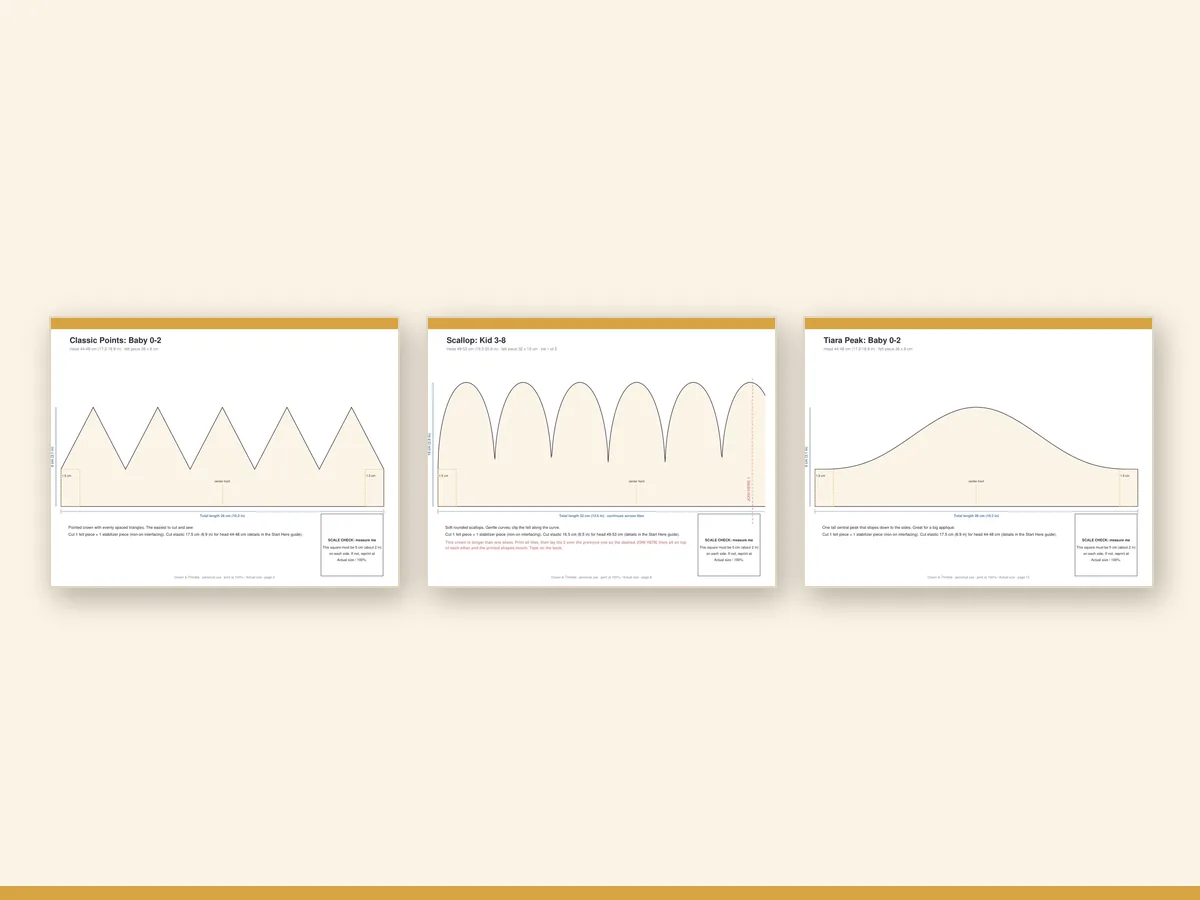
A good printable template saves you the most irritating step in crown making: working out how big everything should be. Print the sheets, tape them, trace and cut. That is the whole promise of the template pages in Crown & Thimble · Felt Birthday Crown Pattern Kit, and this guide explains how to get a clean, correctly sized print the first time.
What "printable template" should mean
Plenty of printables are shapes without sizes. They are a drawing of a crown, not a pattern for one. A real template for a wearable crown needs three things on the page.
- A scale reference. A square of known size, so you can see whether the printer scaled the file.
- A size for each head. A crown for a one-year-old and a crown for a teenager are not the same drawing at different zoom levels. The band length, the height of the points and the proportion of the front panel all change.
- Marks for stitching and layering. Notches or numbers that tell you where things line up.
The crown patterns in the kit have all three. The print check page is a single page with a 2 in / 5 cm square labelled "measure me", and every pattern page carries the same square in a corner.
Print at 100 percent: the only setting that matters
Almost every wrong-sized template comes from a print dialogue that quietly shrinks the page to fit the margins. Before you print:
- Open the PDF in a desktop reader such as Adobe Reader, Preview or a browser PDF viewer.
- Choose Actual size or 100 percent. Do not choose "Fit", "Shrink oversized pages" or "Scale to fit printable area".
- Print the print check page first. Measure the square with a ruler. It should read 2 inches or 5 centimetres, edge to edge.
- If it is 4 or 5 millimetres short, your printer has shrunk the page. Check the scaling option again, and if the printer has a "borderless" mode, turn it off.
It takes two minutes and prevents the sad moment when a felt crown comes out as a doll's hat.
A4 or US Letter
The kit includes both. A4 is the standard in most of the world and US Letter is the standard in the United States and Canada. Both are included for each file so that you never rescale a PDF. If a piece is too wide for one sheet, the pattern is divided into tiles with alignment marks; you trim the margins on two sides and tape the sheets edge to edge.
Tiling a large crown
The Teen/Adult size of the Tiara Peak crown is the biggest piece in the set. A few tips for taping tiles:
- Trim the margin only on the side that overlaps. Taping margin to margin leaves a gap.
- Use low-tack tape so you can lift and reposition a sheet.
- Tape on the back of the sheet if you plan to trace on top; tape can leave a ridge that makes your marker skip.
- After taping, lay a ruler across the join. A straight line should stay straight across the sheets.
From paper to felt
Once you have a clean print, there are three ways to move the shapes onto felt.
Pin and cut. Pin the paper piece to the felt and cut around it. It is fast and works for simple shapes, but pins can distort a floppy felt edge.
Trace and cut. Lay the paper on the felt, trace around it with a fabric marker, chalk pencil or a sliver of dry soap, and then cut on the line. It is a bit slower but gives clean, repeatable results, and it is the method the kit's guide recommends.
Make a cardstock template. Glue the printed paper to thin card, cut it out, and use the card as a stencil. This is the one to use when you plan to make more than one crown in the same shape, or when you want to make a crown for every child at a party.
What the layers look like in print
The appliqué pages are laid out as a sheet of small pieces with large, readable numbers. The pieces are arranged in the order you stack them, so you can cut piece 1 first and work your way along. For a theme like Little Dino, that means a body, then a darker belly, then spots, then an eye. That order is the difference between a design that looks sharp and one that looks muddled.
For a longer tour of the four themes, see birthday crown themes for kids.
Troubleshooting a printed template
- The square is too small. Re-print with scaling turned off.
- The pieces do not meet when taped. You probably trimmed both margins. Re-trim one side only.
- The ink is too light to trace. Switch your print to "standard" quality instead of "draft".
- The paper curls. Lay a heavy book on the printed sheets for a few minutes before you tape.
Why not just draw it yourself?
You can, and many makers do. But a hand-drawn crown has to be fitted and refitted until it works, and each attempt costs a piece of felt. With a template that has the sizes and layers worked out, the first attempt is the real attempt. Over a few birthdays, the time you save is considerable, and the crown turns out more even.
What you get with the kit
Crown & Thimble · Felt Birthday Crown Pattern Kit gives you the printable pattern pages, the Start Here guide, the materials list and the print check page in both paper sizes. The supplies for the crown itself (felt, thread, elastic) are not included, and you choose them.
When your template is printed, continue with the felt birthday crown pattern overview for the full list of what is in the folder, or with the head size chart if you are not sure which size to cut.
A short checklist before you cut any felt
Felt is cheap, but your time is not, and a mis-cut front panel means a second trip to the craft shop. Before the first cut, run through this list.
- The print check square measures 2 in / 5 cm on a ruler, in both directions.
- You have chosen one crown shape and one size, and the printed pieces are all labelled for that size.
- The tiled sheets lie flat and the join lines meet without a gap.
- The appliqué pieces are numbered and you know which colour each number gets.
- You have enough felt for the front, the lining and the appliqué, with a little spare.
If all five are true, cut with confidence. Most of the frustration in crown making happens in the five minutes before this step, and a checklist moves it to the point where fixing it costs nothing.
Keeping the files for next year
A printable template does not wear out. Save the PDFs in a folder named for the project, and next year print the next size up, or a different shape, or a different theme. A parent who makes one crown a year ends up with a small archive of crowns and a reliable method. That is also why paper size matters: if you print on A4 one year and Letter the next, you want the same actual size both times, which is exactly what the check square confirms.