Tiled PDF Sewing Pattern: Print, Tape and Cut Without Errors
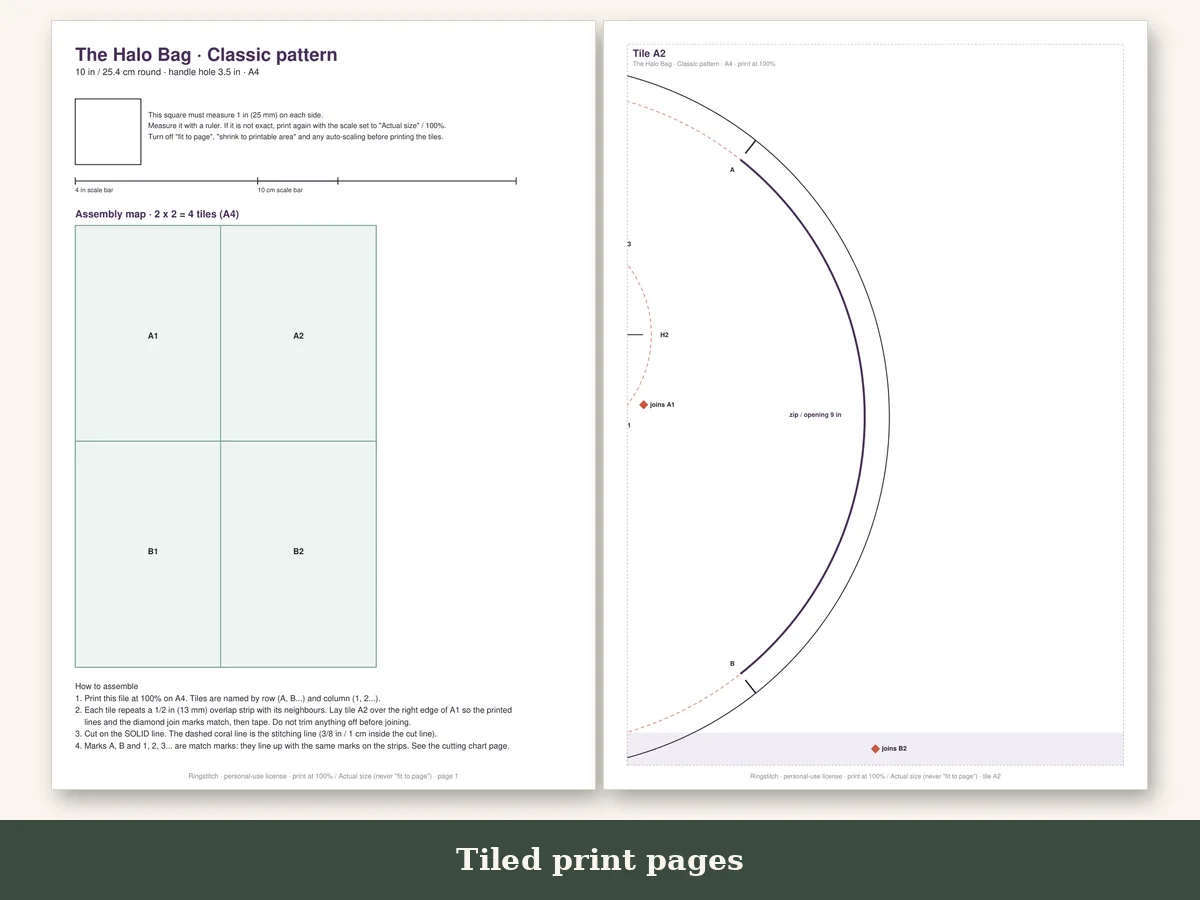
Printing a tiled pattern is a ten-minute job when you do it in the right order, and a ruined afternoon when you do not. Most mistakes come from three things: a scaling setting you did not know was on, taping before checking the size, and trimming the wrong margin. This how-to follows the files in Ringstitch · The Halo Bag Sewing Pattern from Ringstitch, which come tiled for A4 and US Letter with join marks and a 1 inch (25 mm) test square.
What "tiled" means
A sewing pattern for a bag is larger than a sheet of paper. Tiling breaks it into sheets that you print and join. Each sheet carries part of the pattern, and the edges overlap or match so you can line them up. A tiled file is made for a home printer. The alternative is a large-format file that a print shop prints on one wide sheet.
Before you print
Find the right paper size. In the US and Canada use Letter. Elsewhere use A4. The Halo Bag pattern includes both, so choose the file that matches your paper. Printing an A4 file on Letter, or the reverse, is the second most common error, because the margins will cut off part of the page.
Open the file in a PDF reader. Use Adobe Reader or a desktop viewer, not a phone preview or a browser tab. Desktop readers give you reliable scaling options.
Pick the sizes you need. If the pattern has several sizes, you can often print only the pages for one of them. Check the page guide on the first sheet.
The print settings
- Open the print dialog.
- Select Actual size or 100 percent. If you see "Fit," "Shrink to fit," or "Scale to fit," turn it off.
- Choose the paper size that matches your paper.
- Print page 1 only the first time.
Check the test square
Page 1 includes a square, labeled 1 inch (25 mm). Measure it with a ruler. If the sides measure exactly one inch, the print is right. If it is 0.9 inch, the file was shrunk. If it is bigger than 1 inch, something expanded it. Fix the setting and reprint page 1 until it is correct. Only then print the rest.
This five-minute check is the difference between a bag that fits together and one that does not. A scale error of five percent can make panels that should join end up off by the time you reach the handle.
Assemble the sheets
Each sheet has join marks, small symbols or numbers that match the neighboring sheet. Lay the sheets out in a grid following the layout diagram on the first page.
- Trim the margins. The instructions will tell you which edge to trim on each sheet, usually the right and the bottom. Trim along the line with a ruler and a rotary cutter, or scissors.
- Overlap the sheets. Place one trimmed edge over the next sheet, aligning the join marks.
- Tape. Use clear tape or washi tape along the seam, on one side. Tape in several places so it does not lift.
- Work row by row. Join the sheets in each row, then join the rows.
- Check that lines continue across the join. If a curve breaks or jogs at a seam, the sheets are misaligned. Peel and retape.
Lay the assembled pattern on a table and look at the pieces. They should be smooth curves with continuous outlines.
Cut the pattern
Cut out the size you are making along its line. Where the pattern has notches, cut them as small marks or snips. Keep the pieces labeled. With a round bag, mark which piece is the outer, which is the lining and which is the interfacing.
When to use the copy-shop file
Taping twenty sheets can take an hour. A large-format file avoids that: the same pattern prints on one big sheet from a plotter, flat and ready to cut. It is the better choice if you will sew a bag more than once or if you have a shop nearby. Bring the file on a USB stick or email it, and ask for actual size, no scaling. The copy-shop file for the Halo Bag is included with the pattern.
Troubleshooting
Pages are missing a corner. Your printer margin cut off the edge. Use "Actual size" and not "Fit," and make sure the paper size is correct.
The pieces don't meet. Check the test square on every page; if a page was printed with a different setting, reprint it.
Tape wrinkles the paper. Use less tape, or tape on the back only.
The pattern curls. Press the paper flat under a book overnight, or iron it on a low setting with no steam.
Make the paper pattern last
Fuse your pieces to a lightweight interfacing, or trace them onto sturdy paper, if you will reuse them. A pattern you print once can become a pattern you use for years. And because the original file is stored on your computer, you can reprint a clean copy any time.
Then you sew
With the pattern printed and taped, you are ready for the interesting part. The illustrated tutorial in the pattern walks through cutting, clipping the curve and turning the bag, and the notches you transferred will guide every seam. The hard work of preparing is done, and the rest is sewing.
A tidy workspace for taping
Taping a pattern goes faster with a clear table, a cutting mat and a long ruler. Lay the assembled sheets on the mat and slide a ruler along each join to confirm that the lines run straight. Use low-tack tape so you can lift a sheet if it lands crooked. If your table is smaller than the pattern, tape in sections and fold the finished part back on itself. Keep a pencil and a small notepad near by to mark which sizes you plan to cut, and check them against the layout page so you do not cut along the wrong line.
Saving paper and ink
Print the sheets in draft quality if your printer allows it. The lines are for cutting, not for display, and draft mode usually leaves them clear enough. Print only the pages you need, such as the pages for one size, and keep the PDF for the rest. If you intend to make a Mini, a Classic and a Tote over the coming weeks, print them one at a time. This keeps the stack of paper small, and you will only commit the toner for the project in front of you.
What to do with your finished pattern
Fold it along the tape lines and store it in the envelope with the printed tutorial. Write the size and the date on the outside. When you cut fabric, use pattern weights or a few pins in the seam allowance, and trace the notches with a fabric pen. If a piece tears, reprint that page and tape it back. That is the lasting advantage of a digital file: the pattern never really wears out.